Case study 04 — Payroll

Payroll — powerful for HR, not scary for employees

From month-end anxiety and opaque payslips to exceptions-first validation and plain-language salary breakdowns
RoleLead UX Designer
PlatformWeb + Mobile
UsersHR Admins · Accounts Managers · Employees
ScopePayroll Setup · Pre-run Validation · Payslip · Statutory · Reports
Payroll
Step 1 — Empathise

Payroll lives at the intersection of anxiety and trust.

For HR managers and accounts managers, payroll is the highest-stakes task in the HRMS cycle — one wrong value affects every employee's salary. For employees, it's the moment of truth each month: did the system get it right? We interviewed both sides and built detailed persona profiles.

💼
Bhavesh Shah
Accounts Manager, 26 — Ahmedabad — 7 yrs Finance / Taxation
"Automated payroll software helps to reduce the work and calculations. So we can finalise the payroll in 2 days."
Goals
Finish payments in the time window. Verify salary amounts. Check anomalies or mismatches from previous month values.
Frustrations
Arrears is the most frustrating thing to calculate. Validation of investment proofs. Onboarding new employees mid-cycle.
Tools used
Zoho Payroll, Keka HR. Prefers web and mobile access. Domain expertise in Taxation and Tax Law.
Personality
Introvert. Thinker. Problem solver. Tech-savvy. Prefers precision over speed when it comes to numbers.
Pain
  • Arrears calculation is most frustrating
  • Validating investment proofs and amounts
  • Onboarding new employees mid-financial year
  • Uploading previous months data mid-year setup
  • Understanding statutory amounts to transfer to govt
  • Forgetting transfer deadlines — triggers penalties
  • Complex challan generation and return filing
Need
  • Efficient and error-free payroll processing
  • Real-time data for better decision making
  • Focus only on anomaly employees — not all 500
  • Seamless integration with other HR modules
  • Streamlined statutory payment and compliance
  • Statutory deadline countdown with one-click action
👩‍💼
Sonal Kamat
HR Manager, 27 — Bangalore — MBA HR — 5 yrs experience
"We calculated employee payrolls manually with Excel Sheets, but it gave us frequent manual errors. It led us to go with a dedicated payroll application."
Says
Accurate payroll is crucial for employee satisfaction. Compliance with tax regulations is top priority. Issues must be resolved before finalising.
Does
Runs payroll processing, tax calculations, compliance. Cross-verifies software payslip with manual calculation. Adds salary components for new hires.
Sees
Numbers and figures on salaries, deductions, taxes. Pending attendance data for all employees before processing. New hires' salary structures and bank details.
Feels
Anxious at month-end. Stressed about deadlines. Cannot manage work during financial year-end. Satisfied when payroll runs smoothly.
Pain
  • Highly tedious and difficult to set up initially
  • Challenges keeping up with ever-changing tax laws
  • Too many employee queries during peak times
  • Delays in employee investment declarations
  • Irrelevant documents uploaded as investment proof
  • Must focus on anomaly employees — not all 500
Need
  • Efficient and error-free payroll processing
  • Data-driven features to surface anomalies proactively
  • Inline document viewer for investment proofs
  • Mobile access to approve on the go
  • Communication tools to handle employee queries fast
  • Integration with attendance and leave modules
👤
Employee
Receives salary, views payslip, submits investment declarations
"The salary breakup should be clearly mentioned to me." — "Wish I had known how to save tax earlier."
Says
Salary is not credited on time. The system is complex. I don't understand deductions. Approvals take time hence salary credit gets delayed.
Does
Submits investment declarations. Plans financial commitments around pay cycle. Accesses HRMS for pay stubs and tax documents. Files tax returns.
Sees
Salary received on time or not. Bank confirmation when credited. Notification in case of delay. Understanding pay for financial planning.
Feels
Irritated when unable to understand deductions. Happy when salary received. Frustrated with complex interface. Relieved when timely notifications arrive.
Pain
  • Confusion about deductions and changes in pay
  • No option to declare previous employer salary
  • No recommendation to save on taxation
  • Flat tax deduction during variable pay reduces net
  • Arrears not included in payroll calculations
  • FnF settlement calculation difficult to understand
  • Salary deduction for LOP days is unclear
Need
  • Clarity and transparency in pay and deductions
  • Timely notifications for changes in payroll
  • Clearly view TDS and post-tax salary
  • Ability to communicate changes needed to admin
  • Tax saving recommendations and proposals
  • Live tax impact calculator for declarations
HR Admin emotional journey — payroll processing cycle
Emotional arc from payroll initiation through validation, lock and post-run relief
😐Initiate
Payroll
😊View
Exceptions
😟Resolve
Anomalies
😟Investment
Proofs
😰Payroll
Lock
😊Post-Run
Relief
😊Reports
Done
Employee emotional journey — salary cycle
How an employee feels from start of month through declaration, salary credit and deduction review
😐Start of
Month
😐Submit
Declarations
😟Waiting...
😊Salary
Credited!
😕Deductions
Unclear
😐Query
Raised
Key insight from empathy research: Both HR and Accounts personas said the same thing differently — HR said "I must focus on anomaly employees, not waste effort on all employees", and Accounts said "arrears is the most frustrating thing to calculate." Both pointed to the same root problem: the system treats every employee identically during payroll run, forcing manual effort across 500+ people when only a handful have changed. This became the design north star for the pre-run validation flow.
Step 2 — Define

Three distinct failure modes, each with a different owner.

Payroll has a hard deadline and zero tolerance for error. Synthesising the research revealed four failure modes across the payroll lifecycle:

HR / Accounts Manager
Pre-run visibility problem
Before running payroll, HR has no way to see which employees have anomalies — pending attendance, missing declarations, salary revisions — without checking each one by one. Same effort for all 500 when only 20 have changed.
HR / Accounts Manager
Statutory complexity problem
PF, ESI, TDS, PT, LWF have different calculation rules, transfer timelines, and government portals. HR forgets deadlines, triggering penalties. Challan generation and return filing involve multiple manual steps with no system assistance.
Employee
Payslip opacity problem
Employees receive payslips with line items they don't understand — "LOP", "PT", "TDS", "CTC breakup" — with no plain-language explanation. When deductions change, there's no proactive notification. Result: distrust and repeated HR queries.
All personas
Integration gap problem
Payroll is downstream of attendance and leave data. When attendance records have corrections or leave applications are pending, payroll is affected — but the connection was invisible, causing surprise deductions and manual reconciliation.
Defining the lock moment: Once payroll is run and finalised, reversing it is extremely difficult and affects employee trust. The design problem is therefore not just about running payroll — it's about building confidence before the lock happens, so HR can run it without anxiety.
Step 3 — Ideate

The pre-run validation concept: exceptions first, always.

The most consequential ideation decision was how to structure the payroll run initiation. We explored three structural models:

Run-first model
HR runs payroll, then reviews output. Fast to initiate, but puts HR in a reactive position — errors discovered after the fact, reversing is costly. Doesn't reduce the anxiety of the lock moment. Rejected.
Checklist model
Static checklist HR must manually tick before running. Better, but checklist items are hard to keep current and don't surface actual anomalies — only procedural gates. Doesn't catch dynamic issues. Rejected.
Chosen
Exceptions-first model
Before running, system automatically surfaces only employees with anomalies — pending attendance, missing declarations, salary changes, new joiners. HR resolves just those, then locks with confidence. Chosen.

Bhavesh's exact quote drove this decision: "It is better to focus on only those employees rather than same effort for all employees." In a 500-person company, typically 10–30 employees have something to resolve. Surfacing only those saves hours and eliminates "did I miss something?" anxiety.

Payslip ideation: plain language over jargon

For the employee-facing payslip, we explored two directions: a traditional finance-grid format (familiar to accountants, opaque to employees) vs a plain-language card. Research was clear: employees don't need accountant-grade formatting. They need to know their take-home, what was deducted, and why. We chose plain-language design with expandable detail.

Role-based views: one payroll, four perspectives

We mapped four views from the same payroll data: Owner (cashflow summary), HR Admin (full control + statutory), Manager (team salary budget view), Employee (personal payslip + tax calculator). Designing each separately — rather than one screen for all — was the key ideation output.

Step 4 — Prototype

From anxiety to confidence: the pre-run validation flow.

HR Admin — Monthly payroll flow

Initiate Run Review Exceptions Resolve Attendance Verify Declarations Review Salary Changes Confirm and Lock Process Payments

Task flow: HR Admin running monthly payroll

Phase Initiate Validate Resolve Lock and Run Post-Run
Activity Select pay period. Review employees in scope. Check previous month variance summary. System surfaces exception list — pending attendance, missing declarations, new joiners, salary revisions. Approve/override each exception inline. Request corrections from managers. Verify investment proofs in inline viewer. Final review of salary totals. Confirm no overlap or gaps. Lock payroll — permanent action with explicit confirmation. Download payslips. Distribute to employees. Process statutory transfers. Generate compliance reports.
Feeling Routine — familiar monthly process Relief at seeing only anomalies — not all 500 Frustration if exceptions are many. Stress with investment proof validation. Highest anxiety moment — irreversible action Relief and satisfaction when payroll processes cleanly
Design decision Show month-on-month comparison summary at entry — normalises context immediately Categorise exceptions by severity and type. Show count before opening list. Bulk action for common resolutions. Document viewer inline — no separate portal. Show exact impact preview: employee count, total amount, delta from last month. Require explicit "I confirm" action. One-click statutory transfer with deadline countdown. Auto-generate challan drafts pre-filled.

Payslip anatomy — plain language design

Earnings
Basic SalaryRs. 45,000
HRA (House Rent Allowance)Rs. 18,000
Special AllowanceRs. 7,000
Performance BonusRs. 5,000
Gross EarningsRs. 75,000
Deductions
PF — Provident Fund (12% of Basic)Rs. 5,400
ESI — Employee State InsuranceRs. 0
TDS — Income Tax deducted at sourceRs. 2,800
PT — Professional Tax (state)Rs. 200
Total DeductionsRs. 8,400
Net Take-Home This Month
Rs. 66,600
Credited on 1st of every month to your registered bank account
📱 Mobile — Visual Design
Mobile Payroll — 5 screens shipped

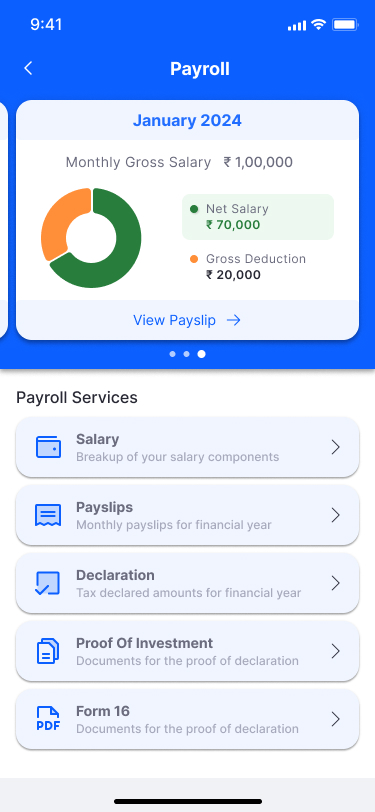
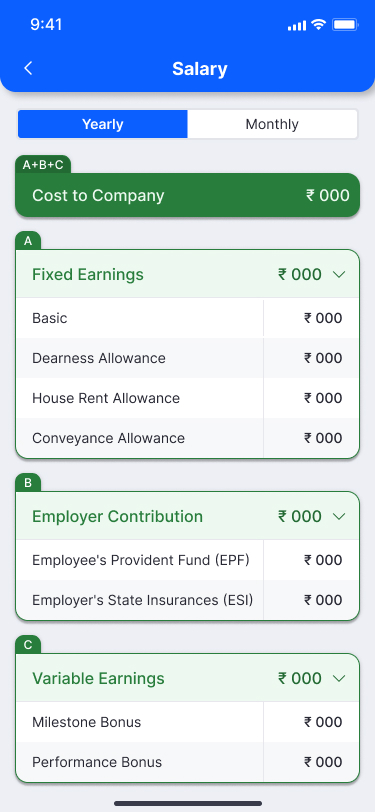
The mobile payroll experience was designed for the employee — not the HR manager. The home card shows net salary with a donut chart at a glance. Deeper screens reveal salary structure, payslip history, and per-payslip detail with a Download PDF CTA. Managers get a separate view with annual CTC breakdown.
Mobile - Payroll home
Payroll HomeJanuary 2024 card: Gross ₹1,00,000 / Net ₹70,000 / Deduction ₹20,000. Donut chart. Payroll Services: Salary, Payslips, Declaration, Proof of Investment, Form 16.
Mobile - Salary structure
Salary StructureYearly/Monthly toggle. CTC = A+B+C. Section A: Fixed Earnings (Basic, DA, HRA, Conveyance). B: Employer Contribution (EPF, ESI). C: Variable Earnings (Milestone Bonus, Performance Bonus).
Mobile - Payslips list
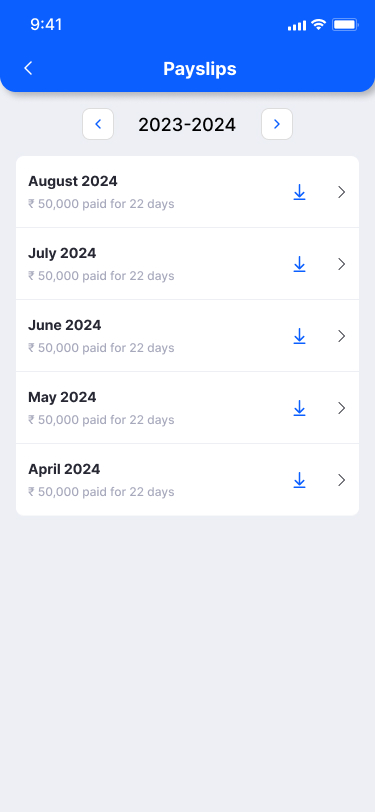
Payslips ListFinancial year navigator (2023–24). Monthly list: August to April 2024. Each row: month, amount paid, working days. Download icon + detail chevron per row.
Mobile - Payslip detail
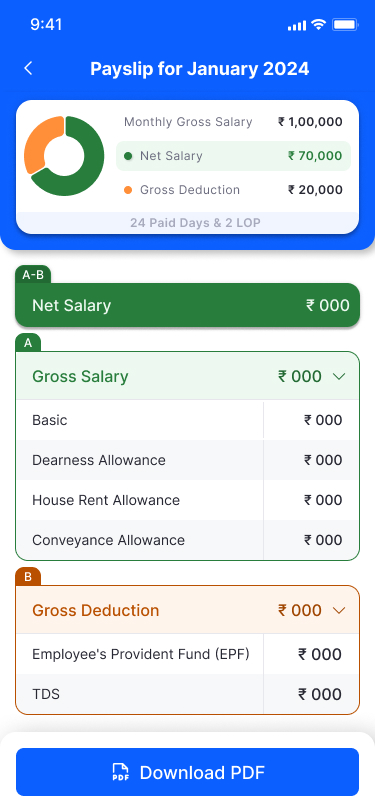
Payslip DetailSummary card: Gross ₹1,00,000 / Net ₹70,000 / Deduction ₹20,000 / 24 Paid Days & 2 LOP. Net Salary (A−B) hero. Gross Salary section A (expandable). Gross Deduction section B (EPF, TDS). Download PDF button.
Mobile - Manager view
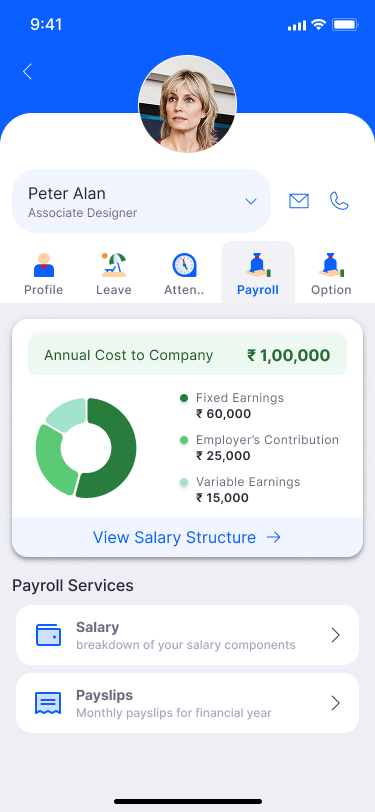
Manager ViewEmployee header (Peter Alan). Annual CTC ₹1,00,000 breakdown: Fixed ₹60k / Employer ₹25k / Variable ₹15k. Donut chart. View Salary Structure CTA. Payroll Services shortcuts below.
Mobile design decision: Net Salary is the hero number everywhere — not Gross. Employees care about take-home. Deductions are revealed progressively, not upfront. This reduced "why is my salary low?" queries to HR by giving employees clear, self-serviceable answers.
🖥️ Web — Visual Design
Web Payroll — 6 core screens shipped

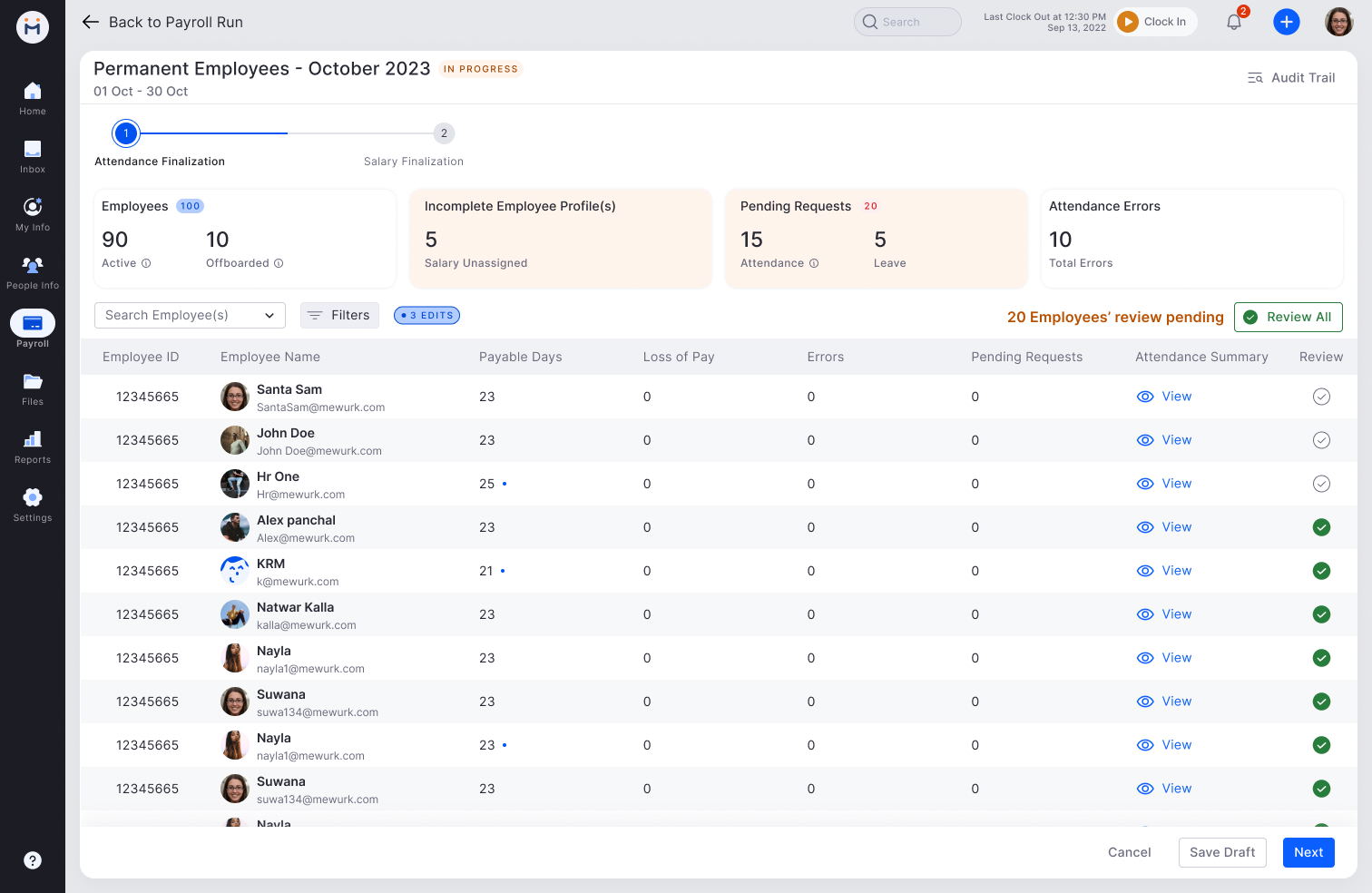
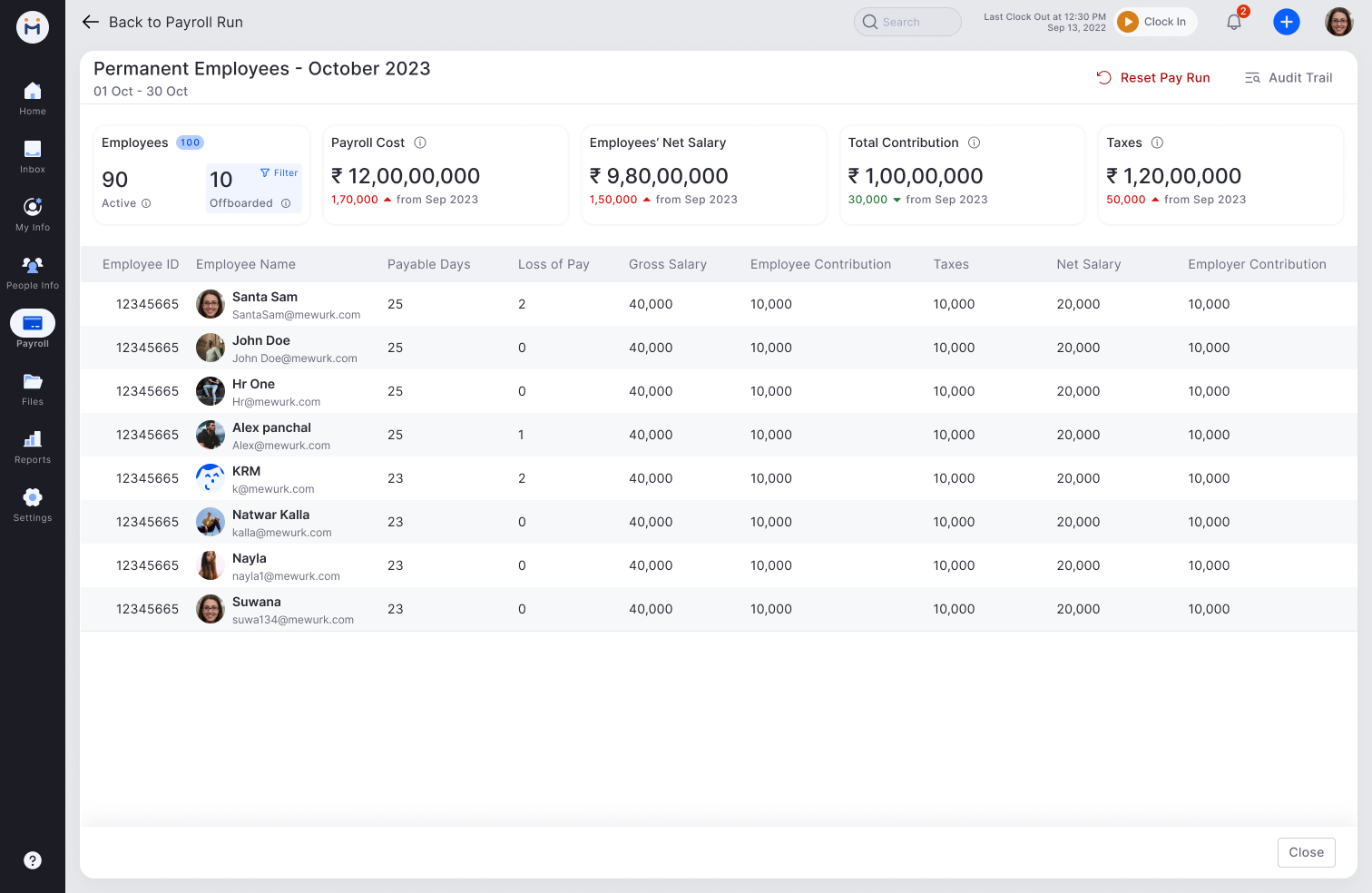
The web experience covers the full payroll lifecycle: salary structure configuration with statutory toggles, the payroll run two-step flow (attendance finalization → salary finalization), final salary summary with audit trail, loan management, and the payslip template builder. Each screen was designed to reduce a specific anxiety identified in research.
Web - Payroll run step 1: Attendance Finalization
Payroll Run — Step 1: Attendance FinalizationTwo-step progress: Attendance Finalization → Salary Finalization. Summary cards: Employees (90 Active / 10 Offboarded), Incomplete Profiles (5 salary unassigned), Pending Requests (15 Attendance + 5 Leave), Attendance Errors (10). "20 Employees review pending" with Review All CTA. Table: Employee, Payable Days, LOP, Errors, Pending Requests, Attendance Summary, Review checkbox.
Web - Payroll run step 2: Salary Finalization
Payroll Run — Step 2: Salary FinalizationTop summary: Payroll Cost ₹12,00,00,000 (+1,70,000 from Sep), Net Salary ₹9,80,00,000, Total Contribution ₹1,00,00,000, Taxes ₹1,20,00,000. Table per employee: Payable Days, LOP, Gross Salary, Employee Contribution, Taxes, Net Salary, Employer Contribution. Reset Pay Run + Audit Trail actions.
Web - Employee salary structure with statutory panel
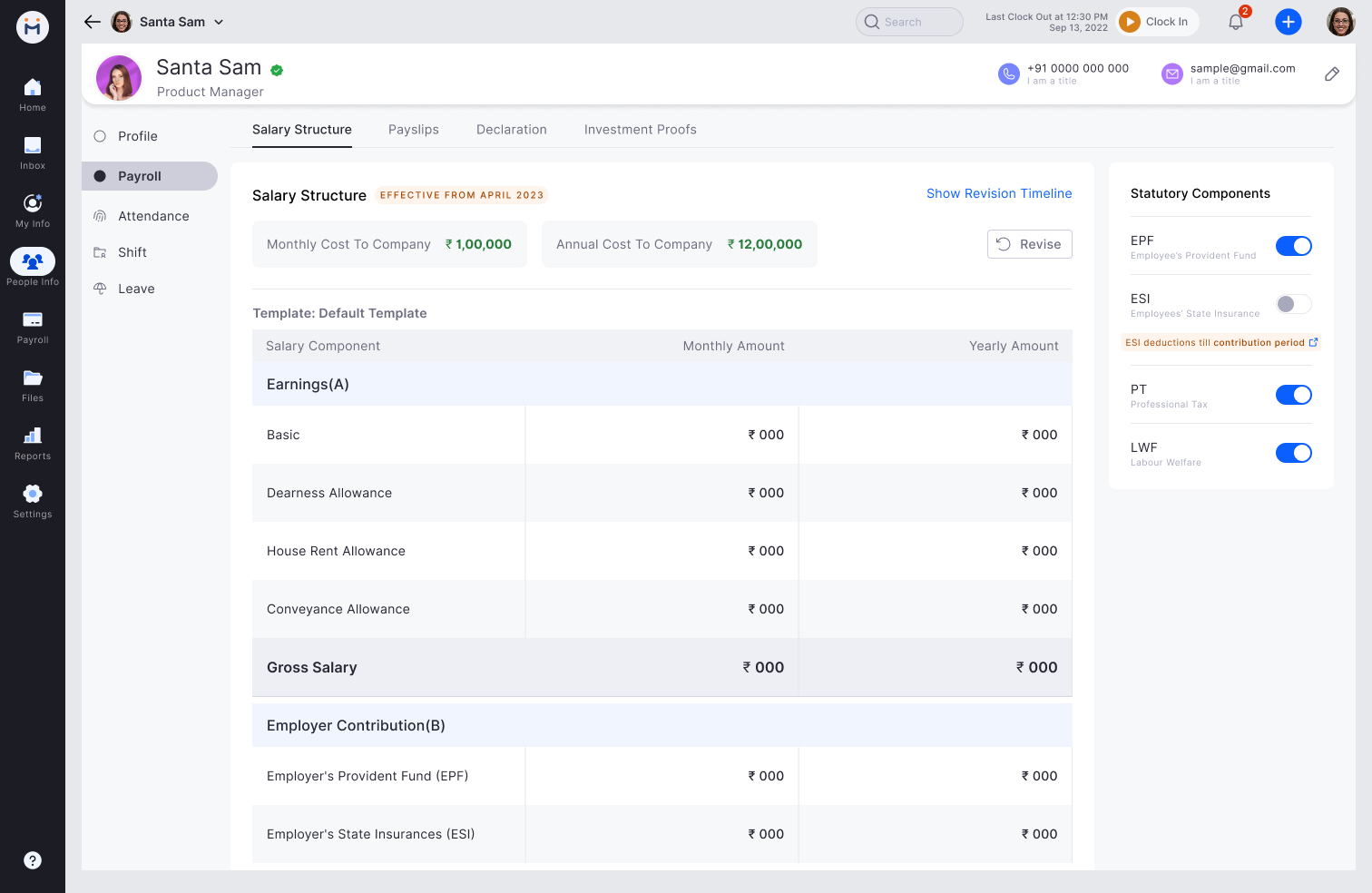
Employee Salary StructureMonthly ₹1,00,000 + Annual ₹12,00,000. Effective from April 2023 + Revise button. Salary revision timeline on right: Future Revision (Approved), Dec 2024, Dec 2023, Dec 2022. Statutory Components panel: EPF (on), ESI (off, with contribution period note), PT (on), LWF (on).
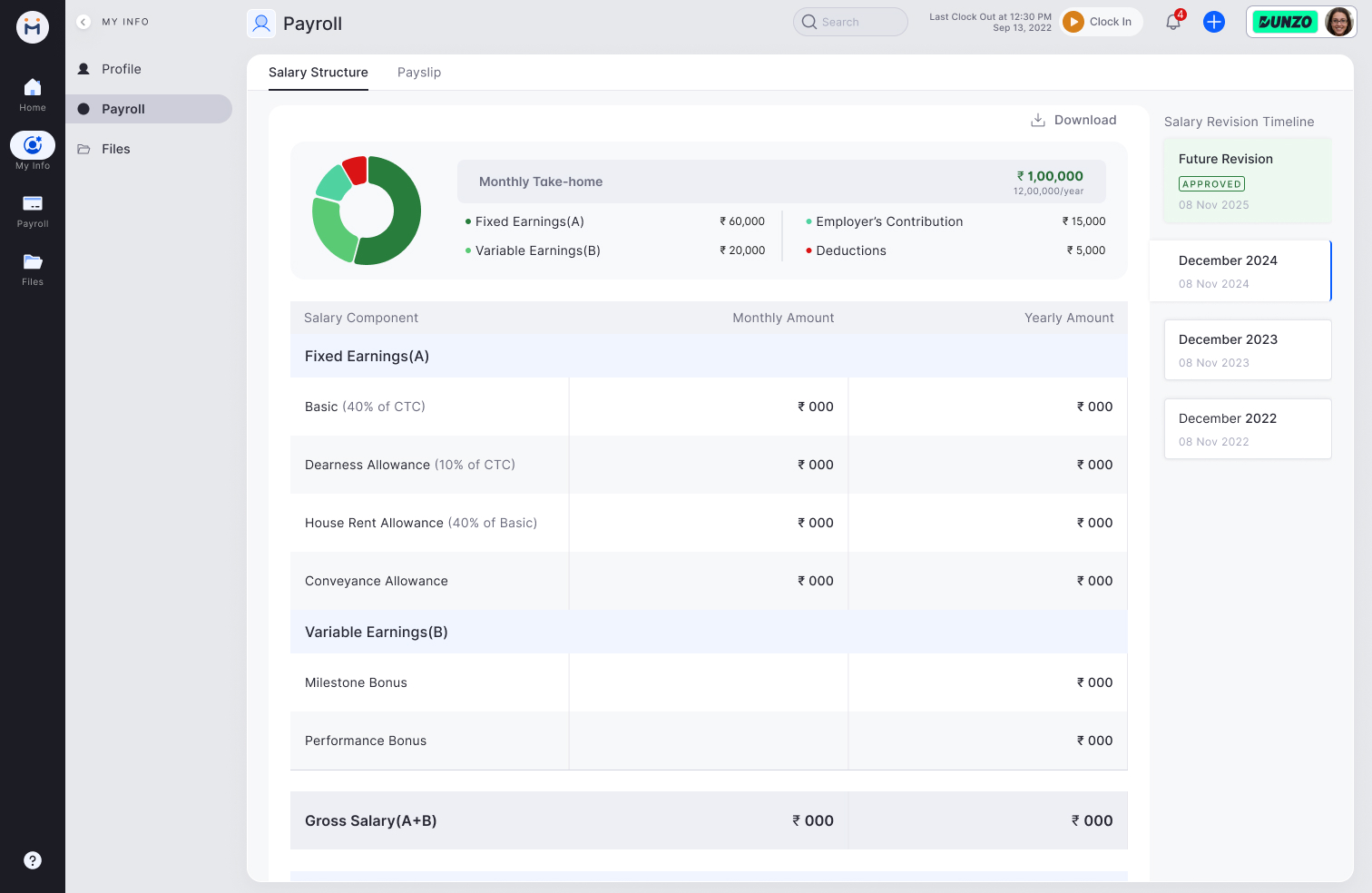
Web - Employee payroll tab (Dunzo)
Employee Payroll — My Info ViewMonthly Take-home ₹1,00,000 (12,00,000/year). Donut chart: Fixed A (₹60k), Variable B (₹20k), Employer Contribution (₹15k), Deductions (₹5k). Salary component table: Monthly + Yearly columns. Fixed Earnings(A): Basic 40% CTC, DA 10%, HRA 40% of Basic, Conveyance. Variable(B): Milestone + Performance Bonus.
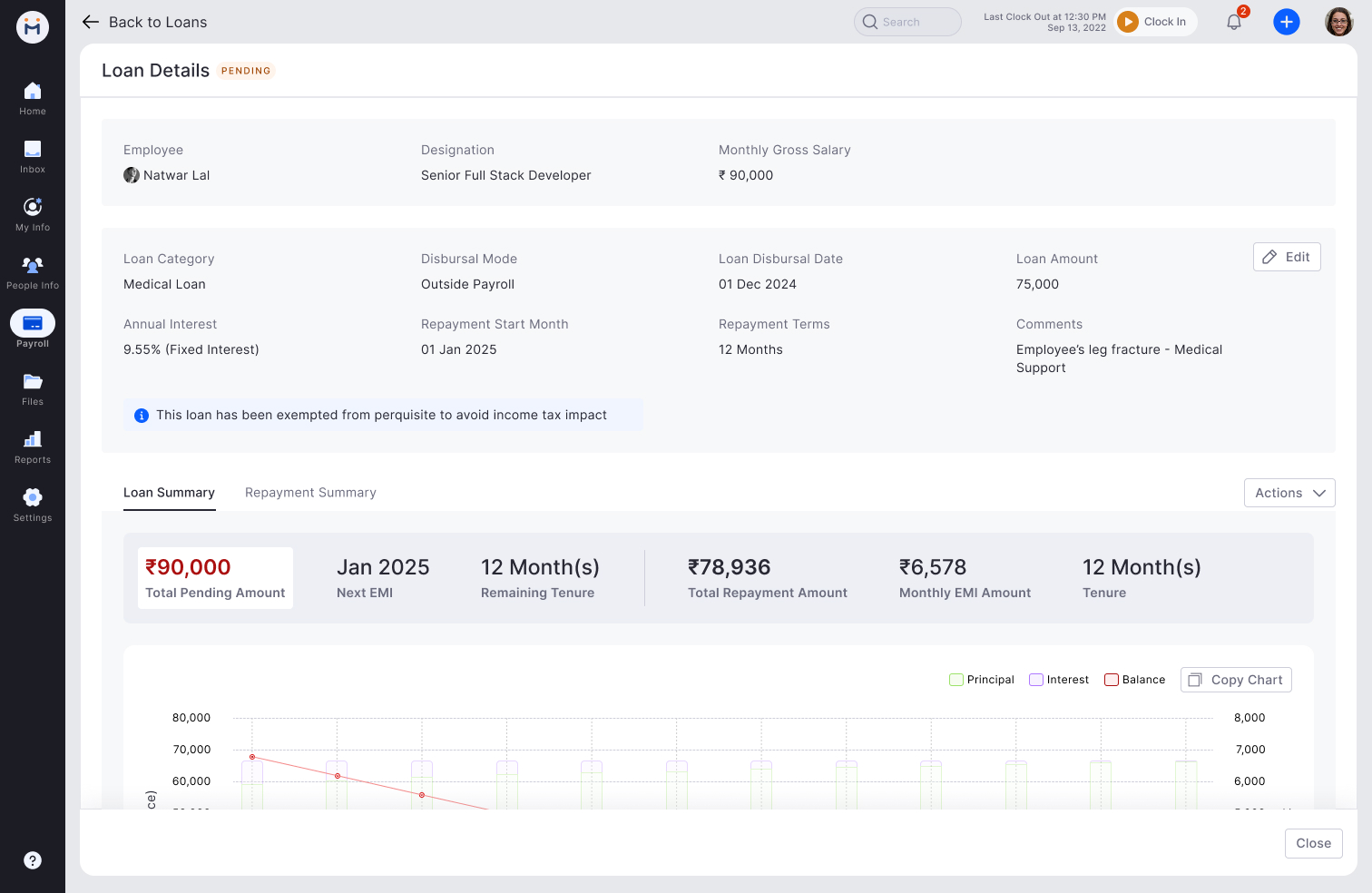
Web - Loan details screen
Loan DetailsEmployee: Natwar Lal (Senior Full Stack Dev). Medical Loan, ₹75,000, Outside Payroll, 9.55% fixed, 12 months. Loan Summary: Total Pending ₹90,000, Next EMI Jan 2025, Monthly EMI ₹6,578. Principal/Interest/Balance chart over repayment period. Tax exemption notice.
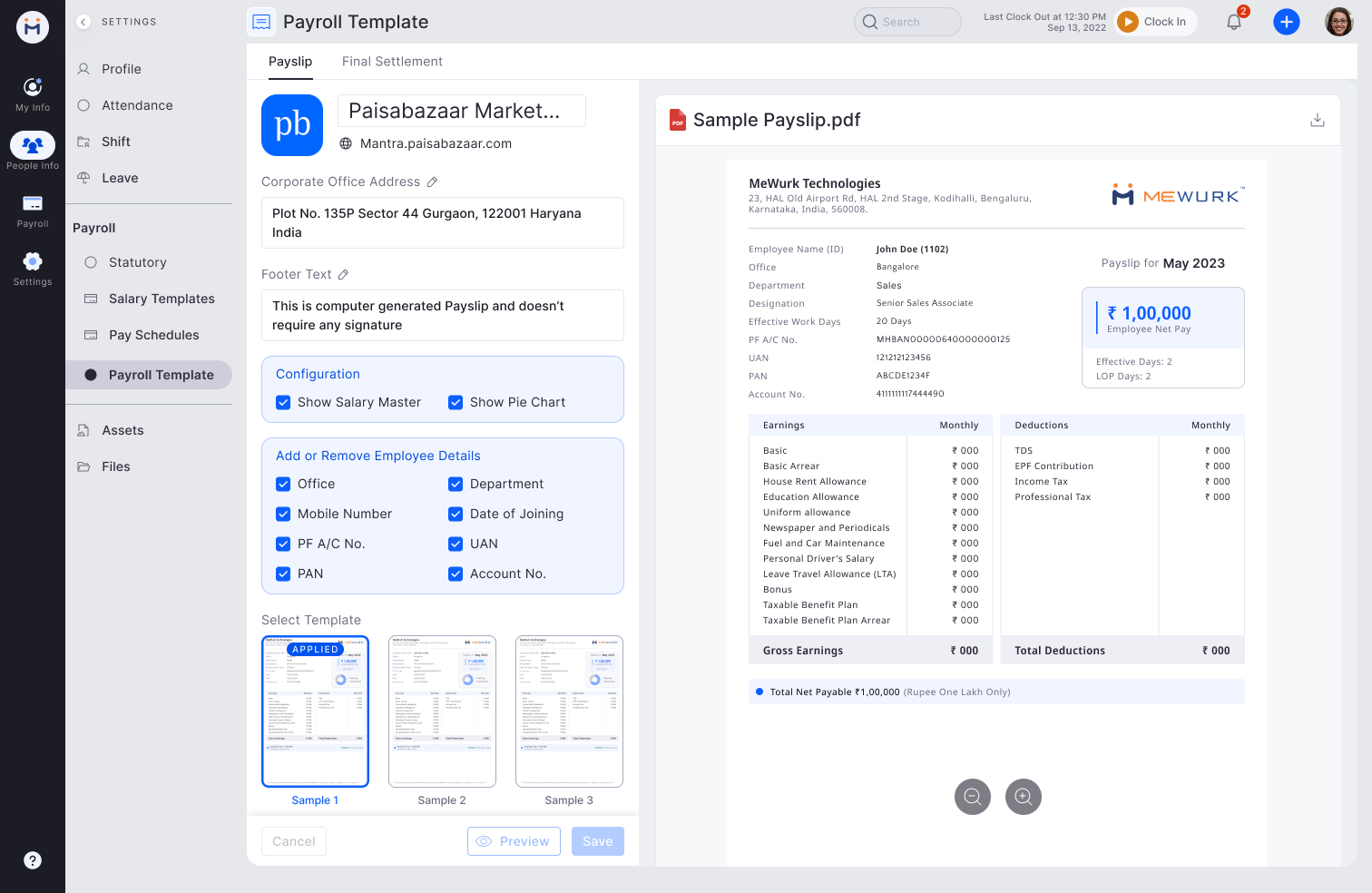
Web - Payslip template builder
Payslip Template BuilderSettings: company logo, address, footer text. Configuration toggles: Show Salary Master, Show Pie Chart. Employee detail checkboxes: Office, Department, Mobile, Date of Joining, PF A/C, UAN, PAN, Account No. 3 template layouts (Sample 1 Applied). Live preview of payslip PDF on right.
📄 Payslip — Final PDF Design
Payslip PDF — Shipped format

The payslip PDF was redesigned to lead with what employees care about — Net Pay as the hero, prominently placed top-right. Company and employee identity at top-left. Earnings and Deductions in clear two-column layout with plain-English labels. Month-on-month delta shown at the bottom (↑₹1000 from Apr 2023). Auto-generated footer eliminates signature confusion.
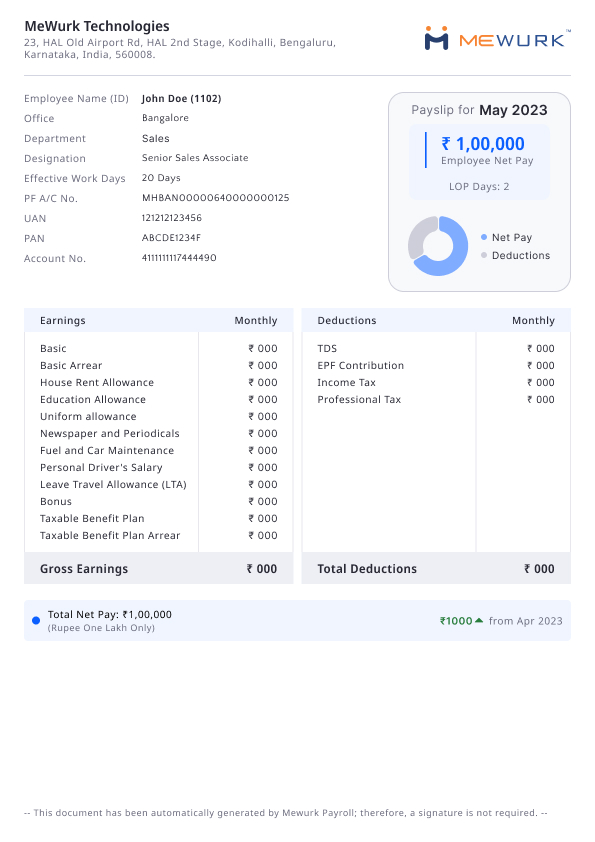
Payslip PDF final design
Payslip PDF — May 2023 (John Doe)Company header: MeWurk Technologies address + logo. Employee info left: Name/ID, Office, Dept, Designation, Work Days, PF A/C, UAN, PAN, Account No. Right: Net Pay hero (₹1,00,000), LOP Days (2), donut chart. Earnings table: Basic, Arrear, HRA, Education Allowance, Uniform, Newspaper, Fuel & Car, Driver, LTA, Bonus, Taxable Benefit. Deductions: TDS, EPF, Income Tax, Professional Tax. Footer: "Auto-generated — no signature required."
Key payslip decision: Net Pay as hero top-right (not buried at the bottom) directly resolved the most common employee complaint: "I can't find how much I actually received." The month-on-month delta (↑₹1000 from Apr 2023) at the bottom proactively answered "why did my salary change?" without requiring an HR call.

Key prototype decisions

Step 5 — Test and Ship

Tested with HR and Accounts users. Four design changes before final release.

Usability testing with HR managers and accounts managers from 4 companies across manufacturing, IT services, retail, and logistics. Key findings that changed the design:

What shipped

🎯
Exceptions-first pre-run validation
System surfaces only anomaly employees before payroll can be locked — categorised by attendance, declarations, salary changes, new joiners.
🔒
Lock confirmation with impact preview
Final screen shows employee count, total amount, and month-on-month delta. Explicit "I confirm" required before irreversible lock.
📄
Plain-language payslip
Net take-home as hero number. Statutory deductions explained in plain language each. Expandable detail for those who want depth.
⏱️
Statutory deadline tracker
Countdown to PF, ESI, TDS, PT, LWF due dates. One-click challan initiation with pre-filled data.
🧮
Live tax impact calculator
Employees see TDS impact of investment declarations before submitting — not just after.
💾
Export to Tally, Zoho, Saral Pay
Matching the tools Indian SME accountants actually use. No manual re-entry between systems.
0
Manual payroll calculations — fully automated with validation layer
5
Statutory components handled — PF, ESI, TDS, PT, LWF
3
Export formats supported — Tally, Zoho, Saral Pay