Five personas. Five different attendance problems.
We ran research sessions with owners, HR managers, blue collar supervisors, and employees across manufacturing, retail, and services. The surprise: the core frustration wasn't about the clocking mechanism — it was about policy complexity, opacity, and the lack of employee agency.
Persona 01 — Owner / HR Admin
👔
Owner / HR Admin
Sets policies, views compliance, manages across departments
"I need to know who's absent before payroll runs — not after I've already processed it."
Says
I want attendance tracking that works without me having to chase managers every month-end.
Thinks
Is this policy actually being followed? Are my rules correct, or has someone gamed the system?
How HR Admin feels across policy setup → daily work → month-end payroll lock
😊Policy Setup
😊Kiosk Goes Live
😟Daily Anomalies
😟Regularise Requests
😊Report Generated
😐Payroll Lock
😊Cycle Complete
Key insight from empathy research: The problem wasn't tracking technology — it was policy intelligibility. HR managers spent more time understanding their own rules than enforcing them. Employees didn't know what policy they were under. The fix: decouple attendance settings from capturing rules, and surface policies in plain language everywhere.
Step 2 — Define
Four distinct failure modes across the attendance lifecycle.
How Might We
Let any HR manager set up attendance policies in minutes — without needing domain expertise?
HR Admin · Owner
Policy complexity problem
Attendance rules vary by shift, location, grade, and employment type. Creating a policy requires HR to understand overlapping criteria — and one wrong configuration causes cascading anomalies for entire departments.
HR Admin · Manager
Modular update problem
Settings (shift timing, grace period) and rules (who the policy applies to) are changed at different frequencies. Mixing them in a single form forces HR to redo everything when only one part changes.
Blue Collar Worker · Floor Manager
Multi-device access problem
White collar employees use app-based check-in. Blue collar workers depend on factory floor kiosks. Field staff need geo-fencing. There's no unified tracking solution — each device context needs different design decisions.
All personas
Exception opacity problem
HR discovers attendance problems when processing payroll — too late to fix cleanly. Employees don't know their attendance status until they're penalised. Managers can't plan coverage because they lack real-time absence visibility.
Step 3 — Ideate
Six approaches explored. Modular + exceptions-first won.
The central ideation question: how do we design policy setup so it doesn't require an HR expert? We ran a whiteboarding session that produced six structural approaches to policy creation, then validated each with HR managers.
Policy structure explored
Single-form policy
All settings and capturing rules in one form. Simplest to understand, but changes to any one field risk breaking everything. Doesn't reflect how HR actually updates policies over time. Rejected.
Chosen
Decoupled modular policy
Attendance Settings (shift timing, grace, leave types) live separately from Capturing Rules (who it applies to). Each updateable independently. Settings update annually; rules update monthly. This matches real HR workflows exactly.
Template-based approach
Pre-built templates for common setups (manufacturing, office, retail). Quick to start but poor fit for SMEs with non-standard rules. Creates dependence on templates and edge cases fall through. Rejected.
Also Chosen
Max 3 criteria rule
Each capturing rule limited to 3 employee criteria (e.g. Department + Grade + Location). Built-in overlap validation prevents same employee matching multiple rules. Eliminates the most common source of payroll anomalies.
Multi-device capturing approach
Chosen
Face-scan kiosk for blue collar
Dedicated tablet/device at factory gate. Face recognition check-in — no phone needed. Offline mode with sync on recovery. Clear visual and audio confirmation. Supervisor override for correction.
Chosen
Geo-fence for field staff
Mobile app detects when field employees enter/leave designated work zones. Auto check-in on entry. Manual override available. Works in background without requiring active app use. Captures real movement accurately.
Step 4 — Prototype
Modular setup flow + exceptions-first dashboard.
Two major flows were prototyped: the policy setup wizard (for HR admin) and the month-end exceptions dashboard. Both were tested with actual HR managers.
HR Admin — Policy setup flow
Create Policy→Configure Settings→Applicable For→Assign Employees→Policy Active
Employee — Mobile check-in flow
Open App→Check In (GPS / QR / Manual)→Work in Progress→Check Out→Attendance Recorded
HR Admin — Month-end attendance task flow
Phase
Policy Setup
Daily Monitoring
Exceptions Review
Regularisation
Payroll Lock
Activity
Create attendance policy with shift, grace period, leave types. Configure capturing rules with max 3 criteria. Assign to employees.
Monitor live dashboard. Review absent/late counts. Check kiosk status. Alert floor managers for realtime absences.
System surfaces exception list: late arrivals, missing check-outs, overtime, anomalies. Bulk-review by exception type.
Approve or reject regularisation requests inline. Add notes. Batch-process similar requests. Flag for payroll impact.
Confirm all exceptions resolved. Review attendance summary by department. Export report. Lock month for payroll processing.
Feeling
Satisfied when policy creates without conflicts
In control — real-time view reduces surprises
Frustrated by volume if exceptions are many
Neutral to positive — workflow is clear
Relieved when all resolved before lock
Opportunity
Policy preview showing which employees will be affected before activation
Proactive absence alerts to managers before shift gaps become a problem
Categorise exceptions by type. Show root cause. One-click bulk resolution for identical patterns.
Auto-suggest resolution based on manager approval history. Batch approve same-reason requests.
Show delta from last month. Highlight anomalous departments. Require explicit confirmation.
Step 5 — Test and Ship
Validated. Iterated. Shipped across 100+ companies.
Usability testing with 8 HR managers across 3 industries (manufacturing, IT, retail) surfaced four changes before final release. The exceptions dashboard and modular policy setup were the highest-rated features.
🖥️ Wireframes → Visual Design
Wireframes — Early-stage flow exploration
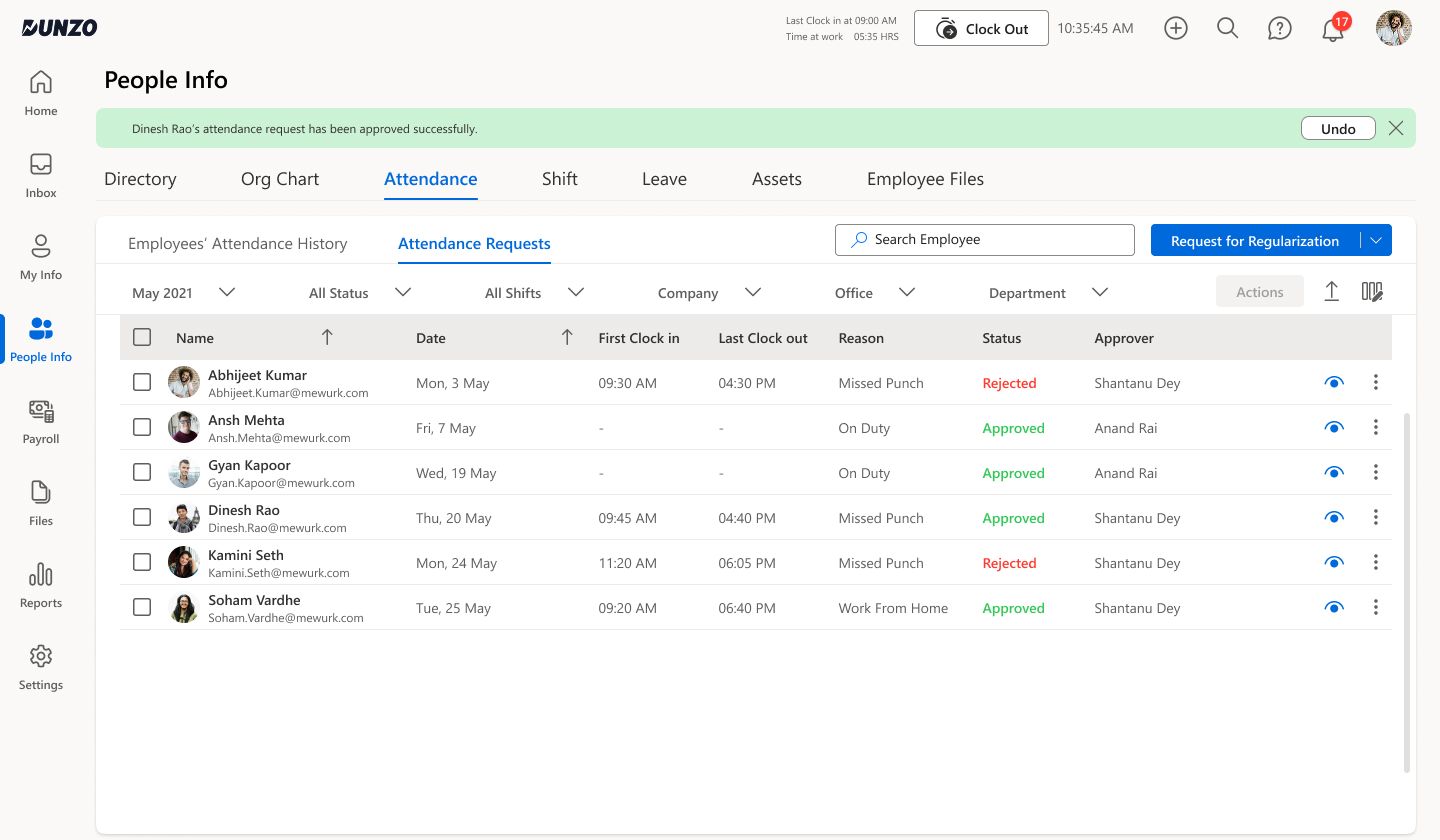
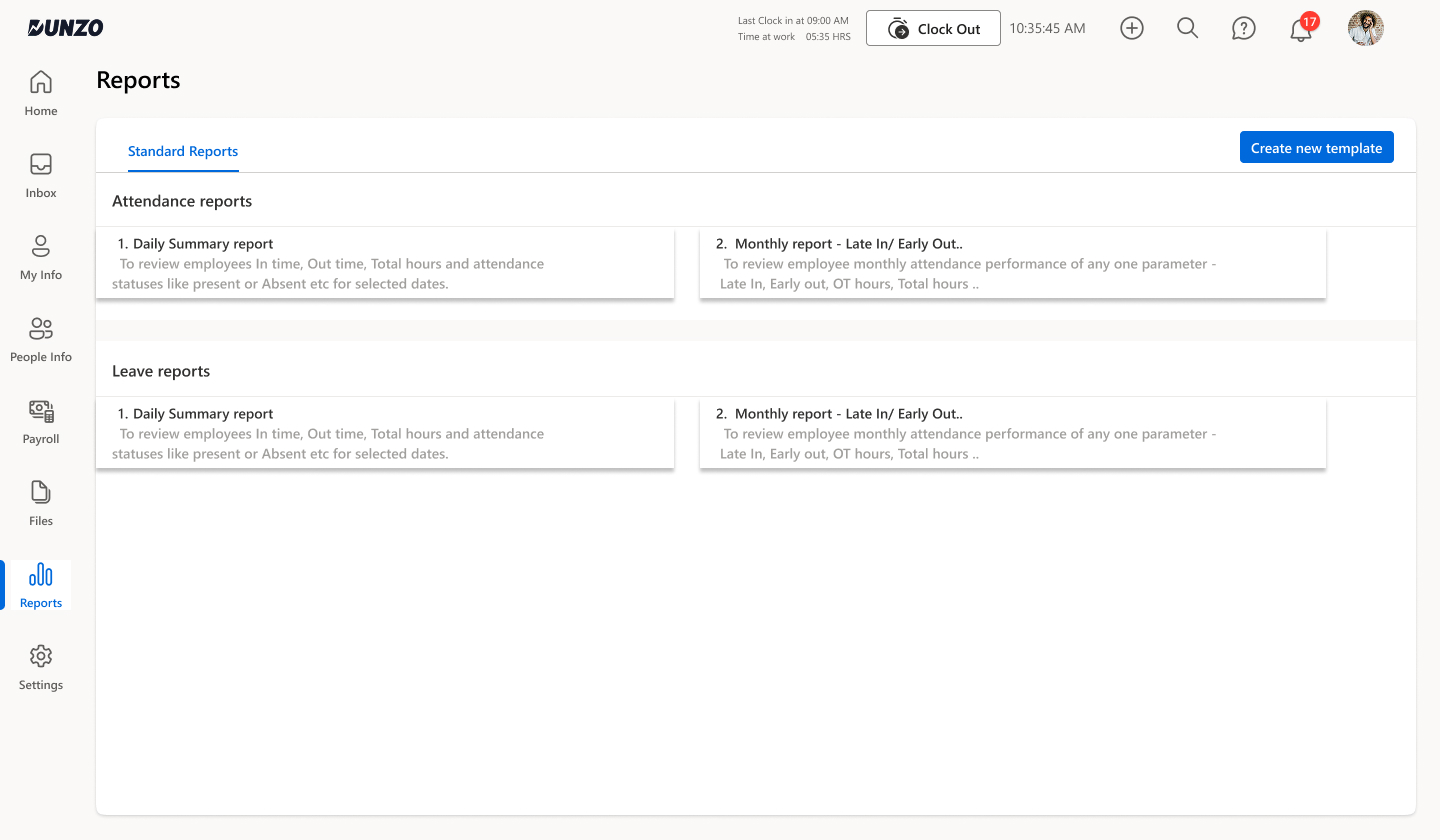
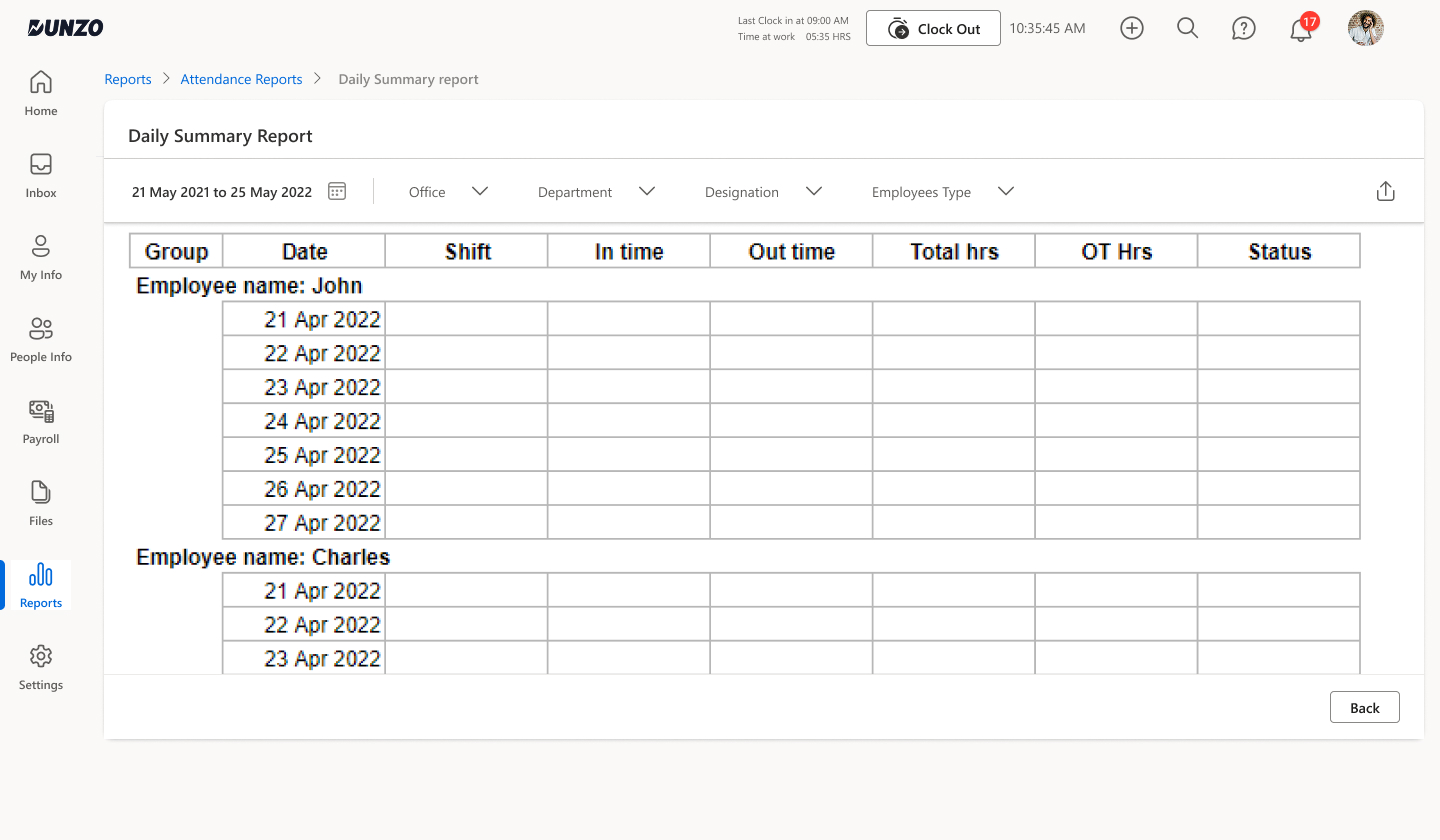
Wireframes covered the four core HR workflows: the regularisation request list with filter/search, the reports menu structure, and the two main report formats (Daily Summary and Monthly Summary). These early flows validated the information hierarchy before visual polish was applied.
Attendance Requests (Wireframe)Attendance Requests tab with name, date, first clock-in/last clock-out, reason, status (Approved/Rejected) and approver. Month + status + shift filters. Approve/reject actions inline. Toast notification on action.
Reports Menu (Wireframe)Standard Reports library split into Attendance Reports and Leave Reports. Two templates each: Daily Summary (in/out/total hours/status per day) and Monthly Report (late in, early out, OT hours). Create new template CTA.
Daily Report — Empty State (Wireframe)Date range + filter controls at top. Grouped by employee (John, Charles). Columns: Date, Shift, In time, Out time, Total hrs, OT hrs, Status. Empty rows show structure before data loads.
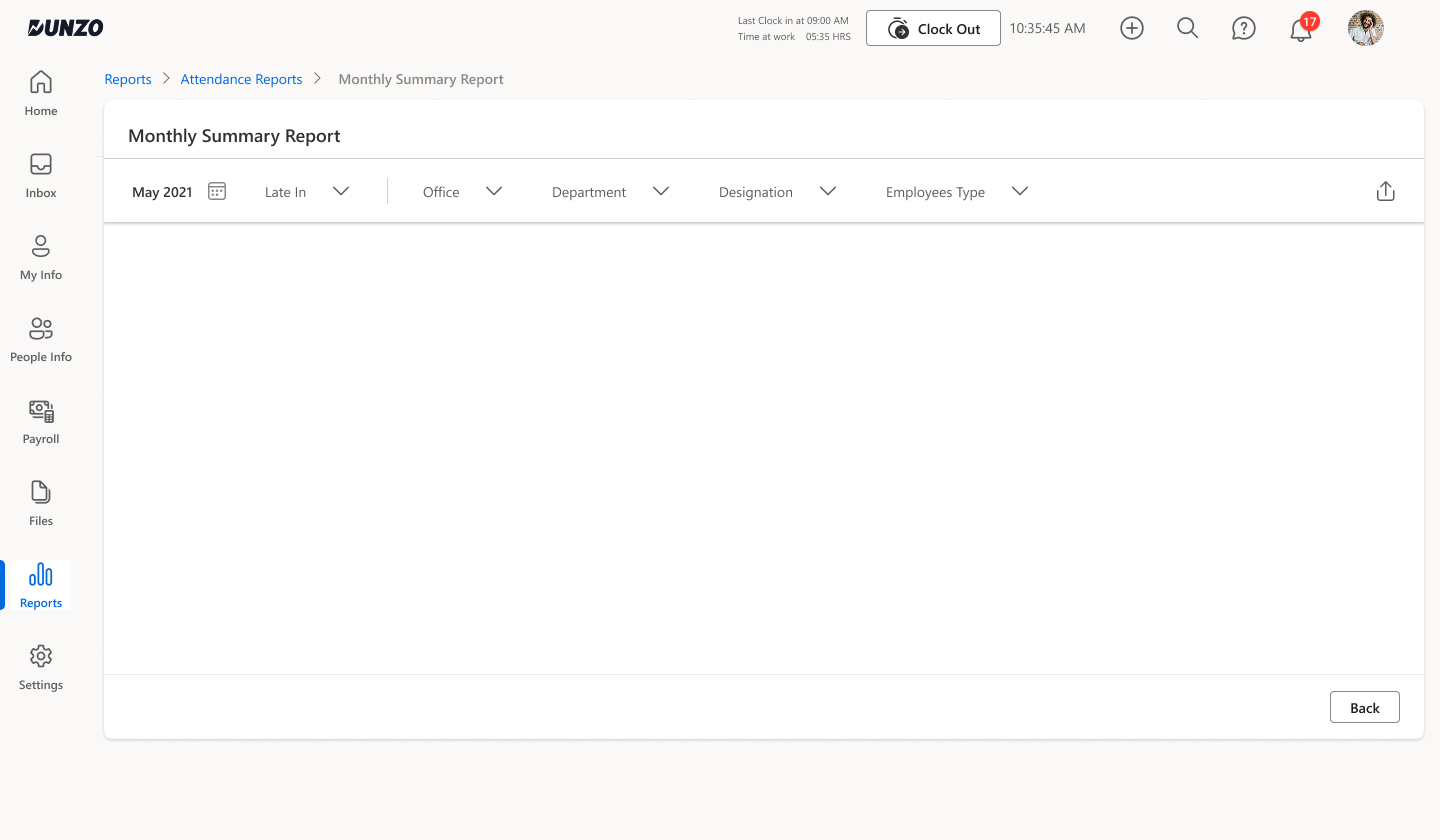
Monthly Report — Empty State (Wireframe)Month selector + filters. Blank canvas in early wireframe — validated navigation and filter placement before data rows were added in visual design.
Reports — Wireframe to Final
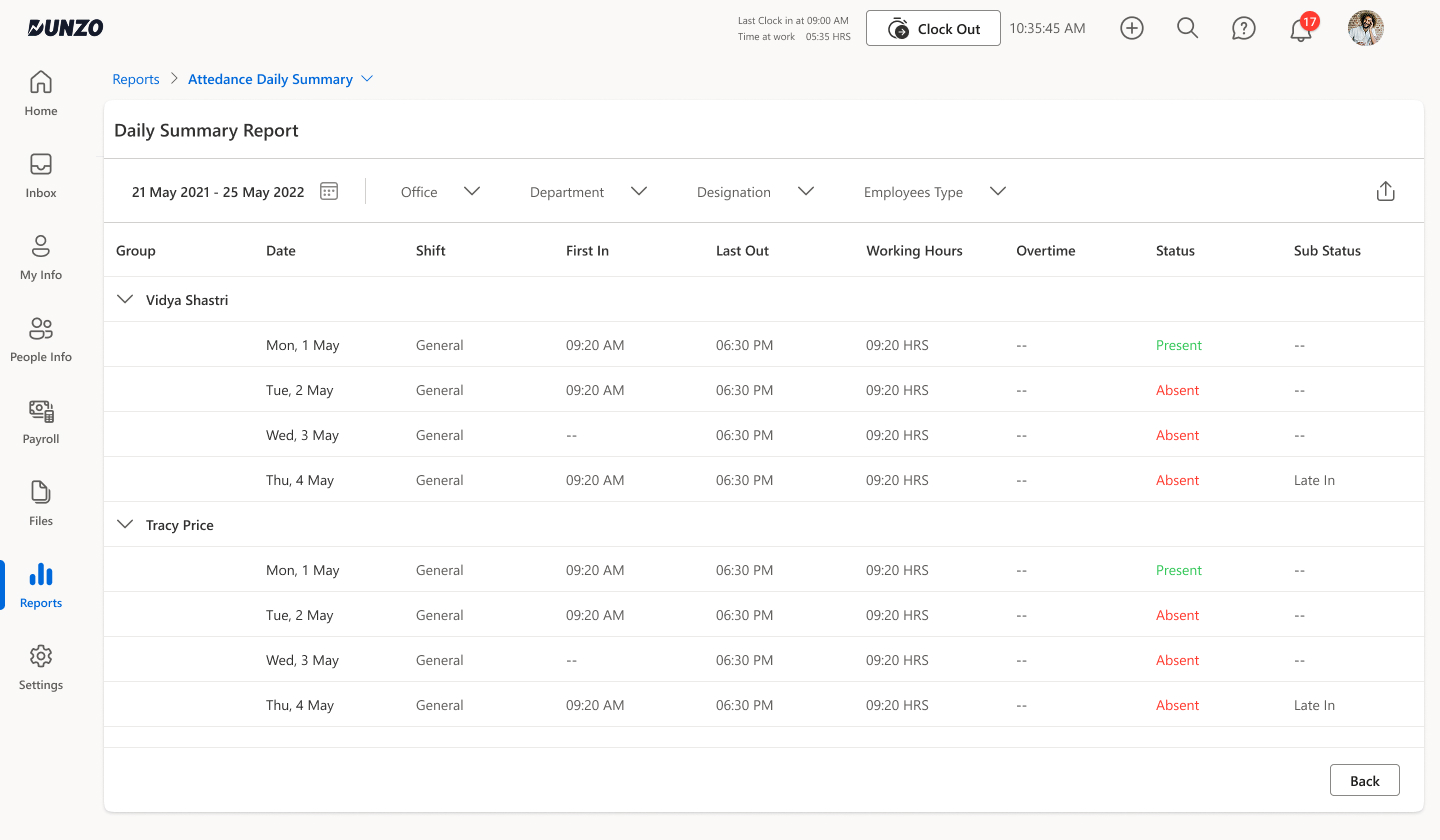
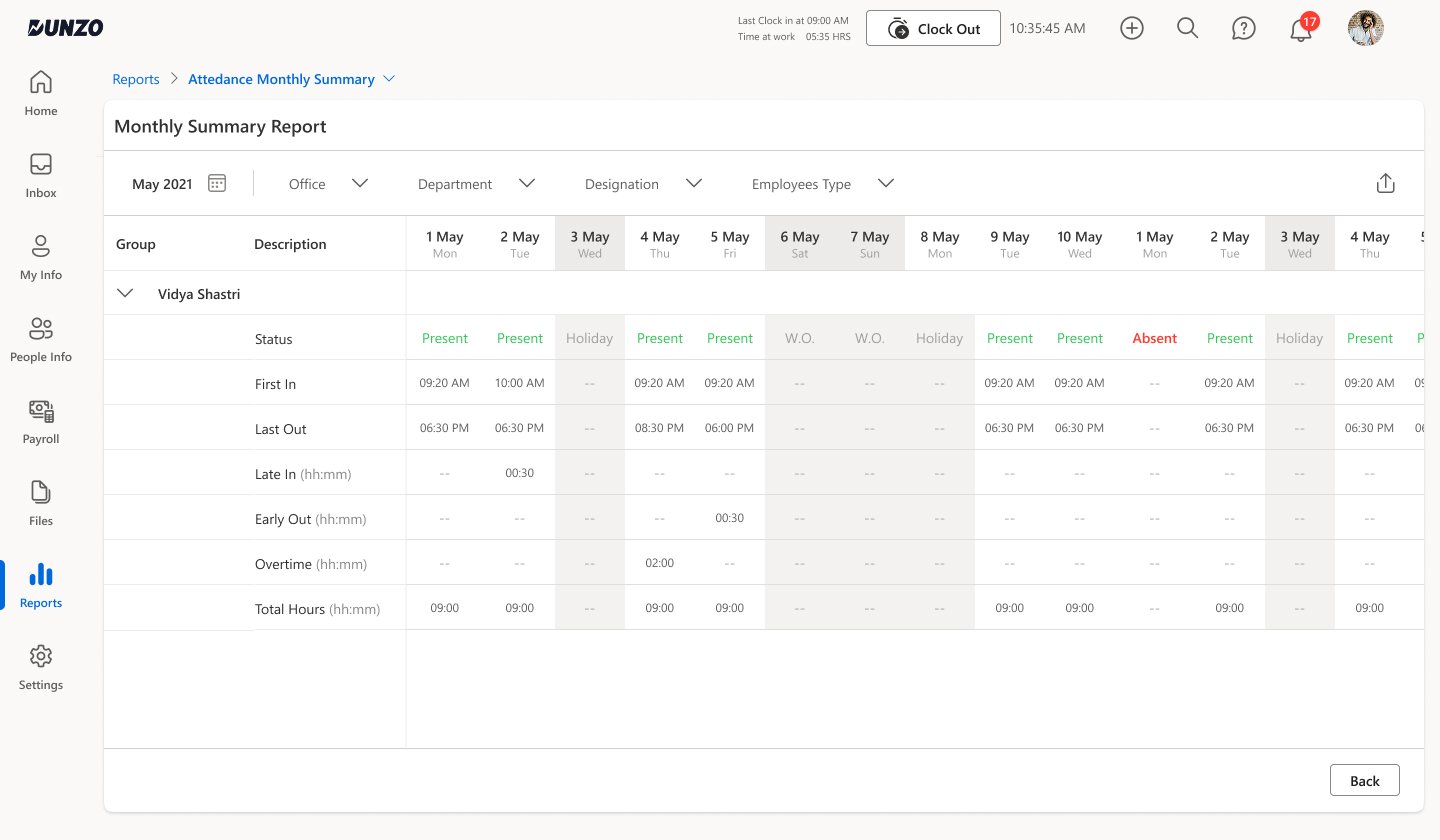
The final report screens applied real data and the Mewurk design language. Daily Summary shows per-employee, per-date rows grouped by name with Sub Status (Late In). Monthly Summary uses a date-column matrix showing Status, First In, Last Out, Late In, Early Out, Overtime and Total Hours — all scannable across the month at a glance.
Daily Summary Report — FinalGrouped by employee (Vidya Shastri, Tracy Price). Columns: Date, Shift, First In, Last Out, Working Hours, Overtime, Status (green Present / red Absent), Sub Status (Late In). Full data with real attendance status per row.
Monthly Summary Report — FinalDate-column matrix (1 May → 31 May). Rows: Status, First In, Last Out, Late In, Early Out, Overtime, Total Hours. Weekend/holiday columns greyed. Status uses colour: Present (green), Absent (red). Holiday and W.O. labelled.
Visual Design — Core screens shipped
Six final screens covering the complete attendance lifecycle — from policy configuration through daily monitoring, exception management, geo-fence setup, employee-level analytics, and location verification. Each screen resolved a specific pain point identified in research.
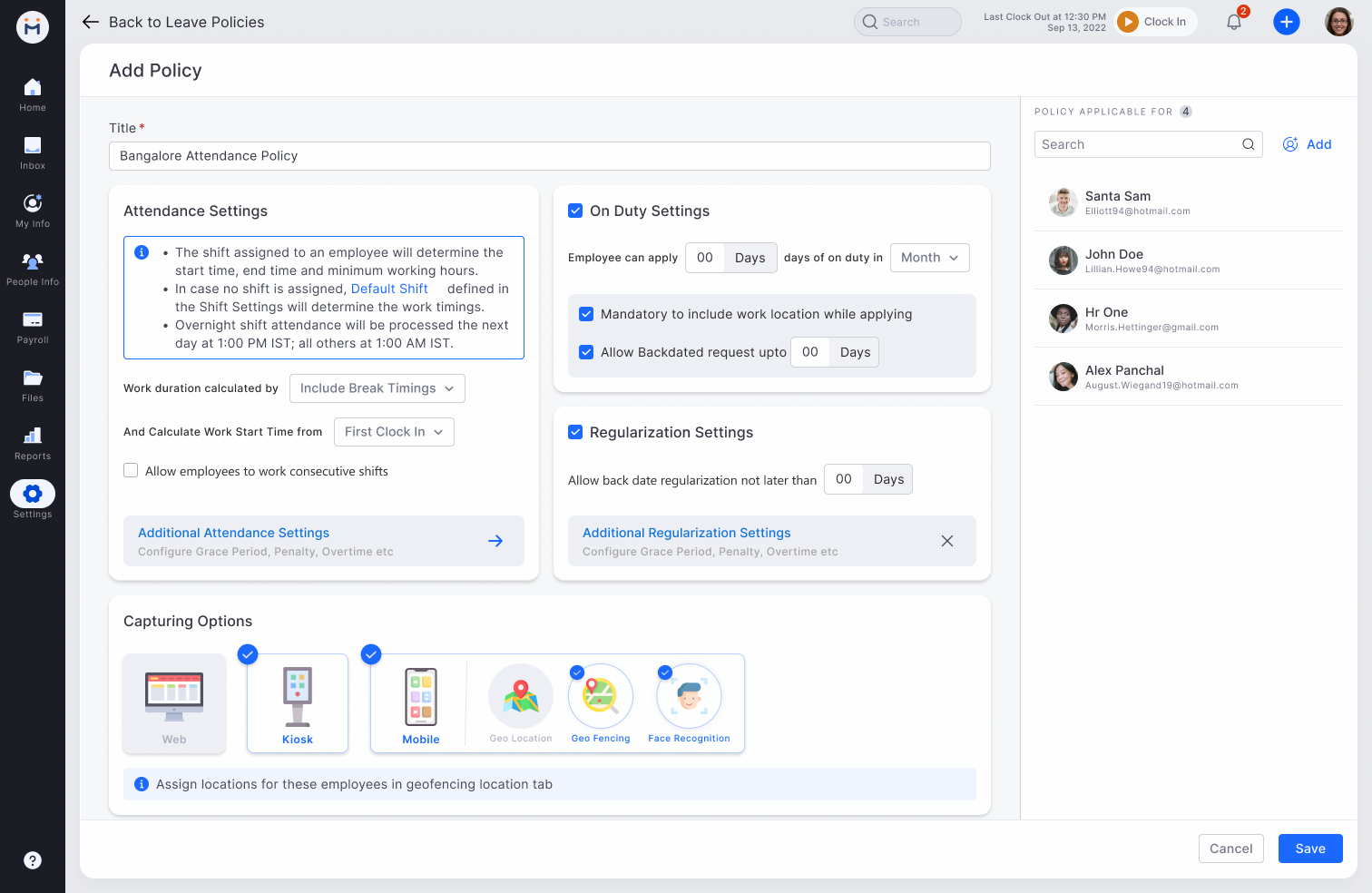
Add Policy — FinalTitle + Attendance Settings (shift-driven times, break calculation, consecutive shifts toggle). On Duty Settings section. Regularisation Settings. Capturing Options: Web / Kiosk / Mobile / Geo Location / Geo Fencing / Face Recognition — all selectable as icons. Policy Applicable For panel on right with employee list.
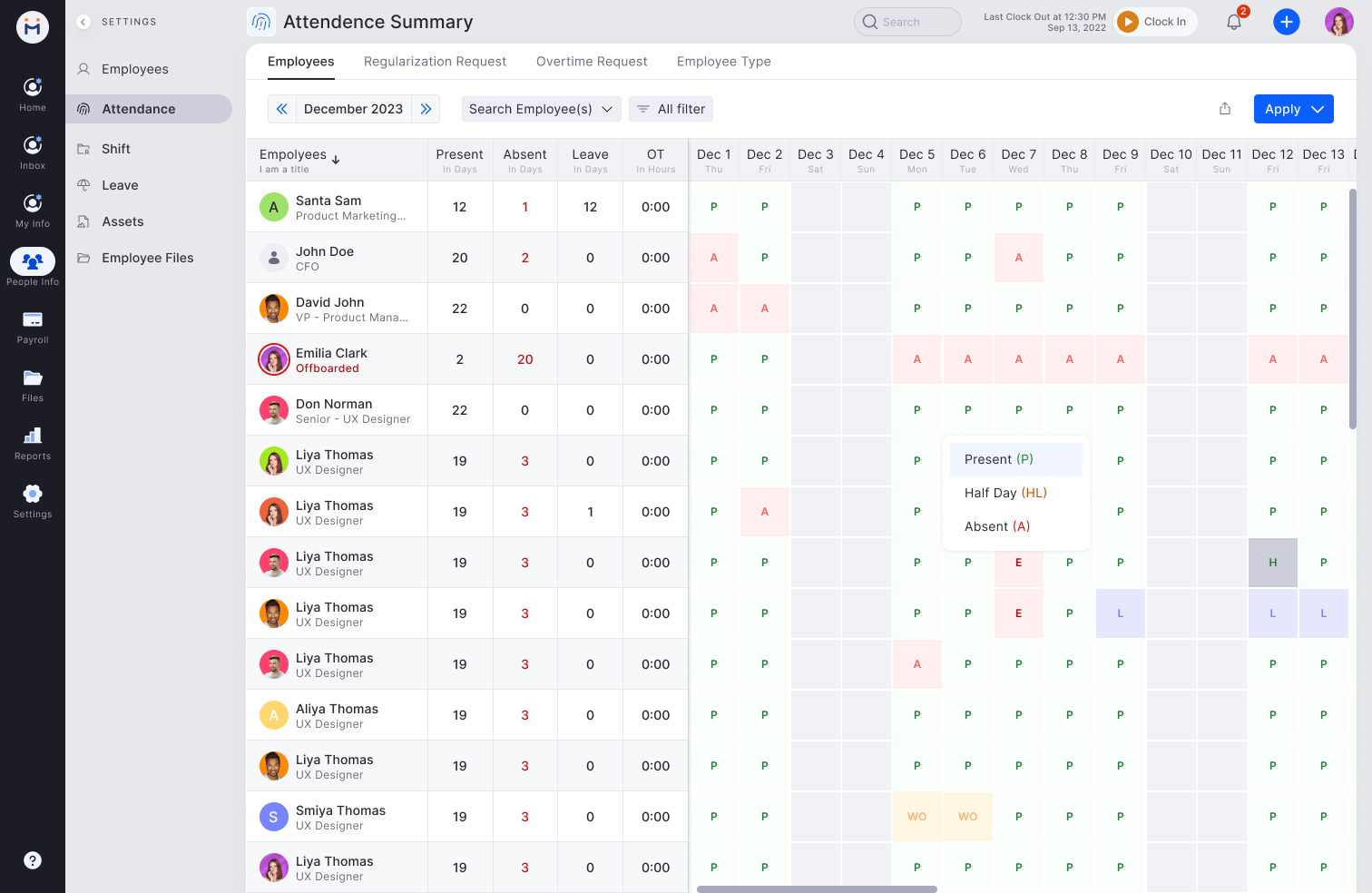
Attendance Summary — FinalCalendar grid: employees as rows, dates as columns. Cells show P (Present), A (Absent), HL (Half Day), E (Error), L (Leave), H (Holiday), WO (Week Off). Summary columns: Present/Absent/Leave days + OT hours. Month navigator. Legend tooltip. Tabs: Regularisation Request, Overtime Request, Employee Type.
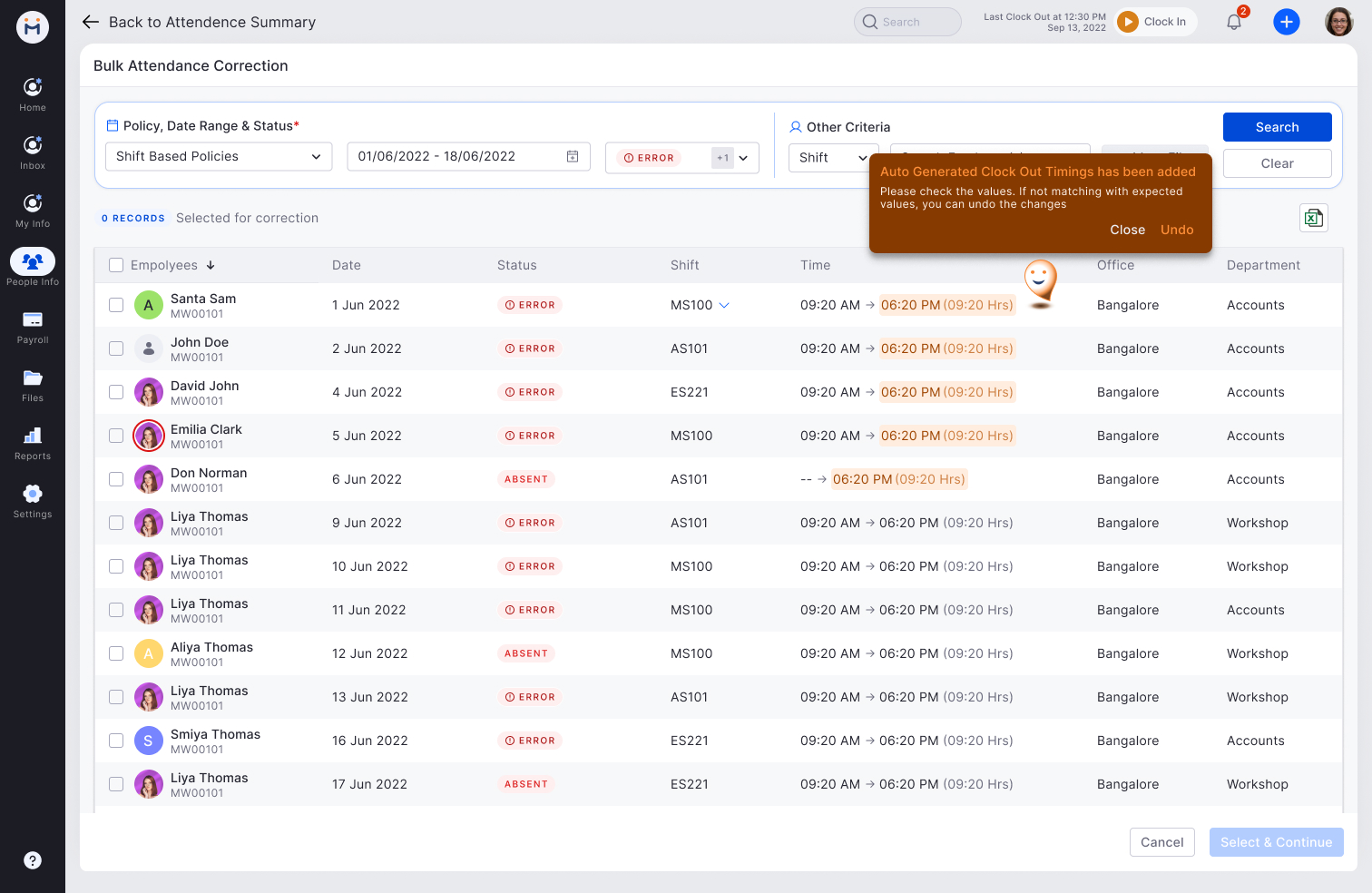
Bulk Attendance Correction — FinalFilter by policy, date range, status (ERROR / ABSENT). Table: Employee, Date, Status badge, Shift, Time (auto-generated clock-out highlighted in red). Toast: "Auto Generated Clock Out Timings has been added — check values, undo if wrong." Checkbox multi-select for batch correction.
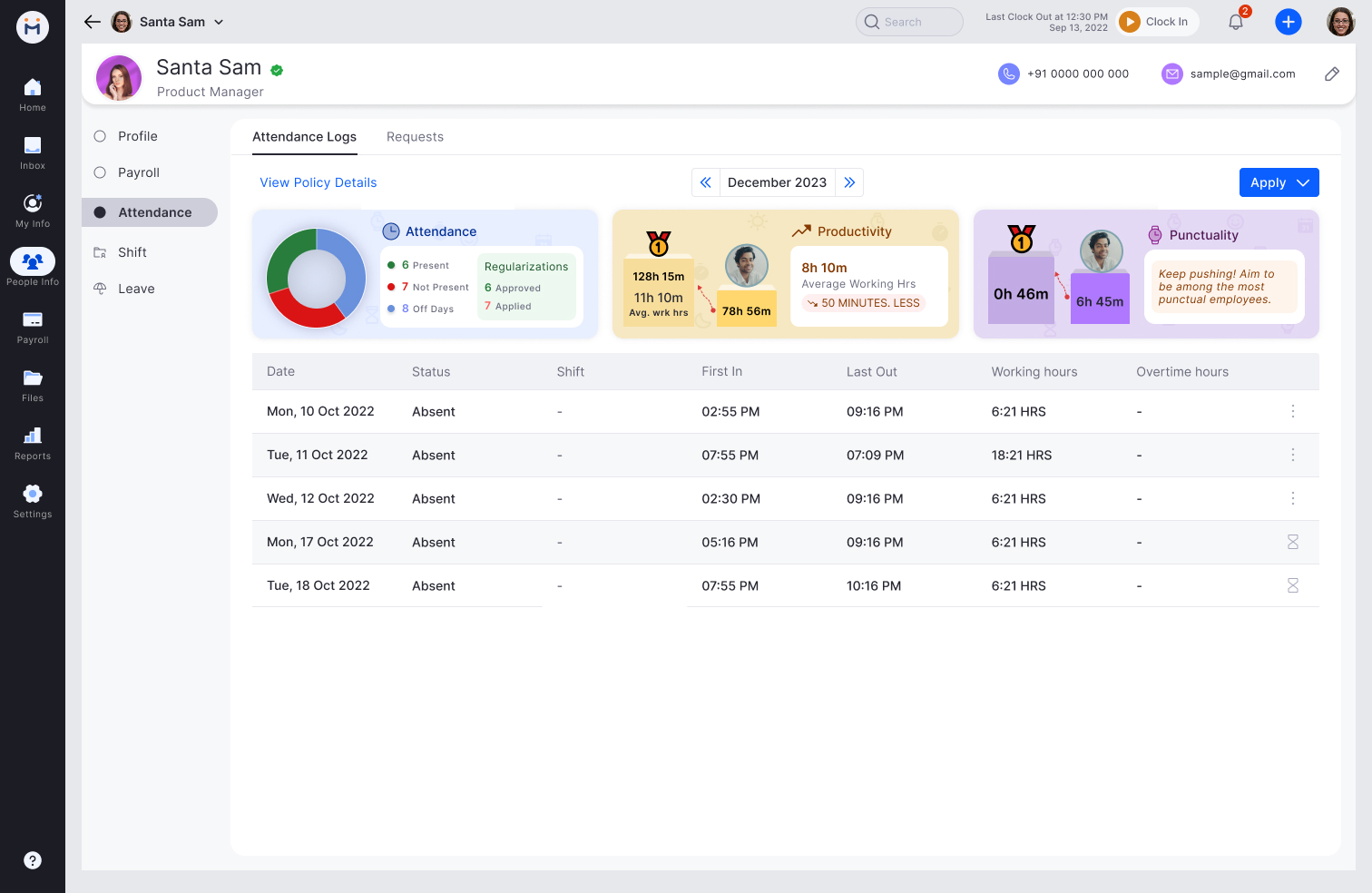
Employee Attendance Card — FinalThree summary widgets: Attendance donut (Present/Not Present/Off Days + Regularisations), Productivity bar (avg working hrs vs benchmark with delta), Punctuality comparison (your avg vs top employees). Log table below: Date, Status, Shift, First In, Last Out, Working Hours, OT.
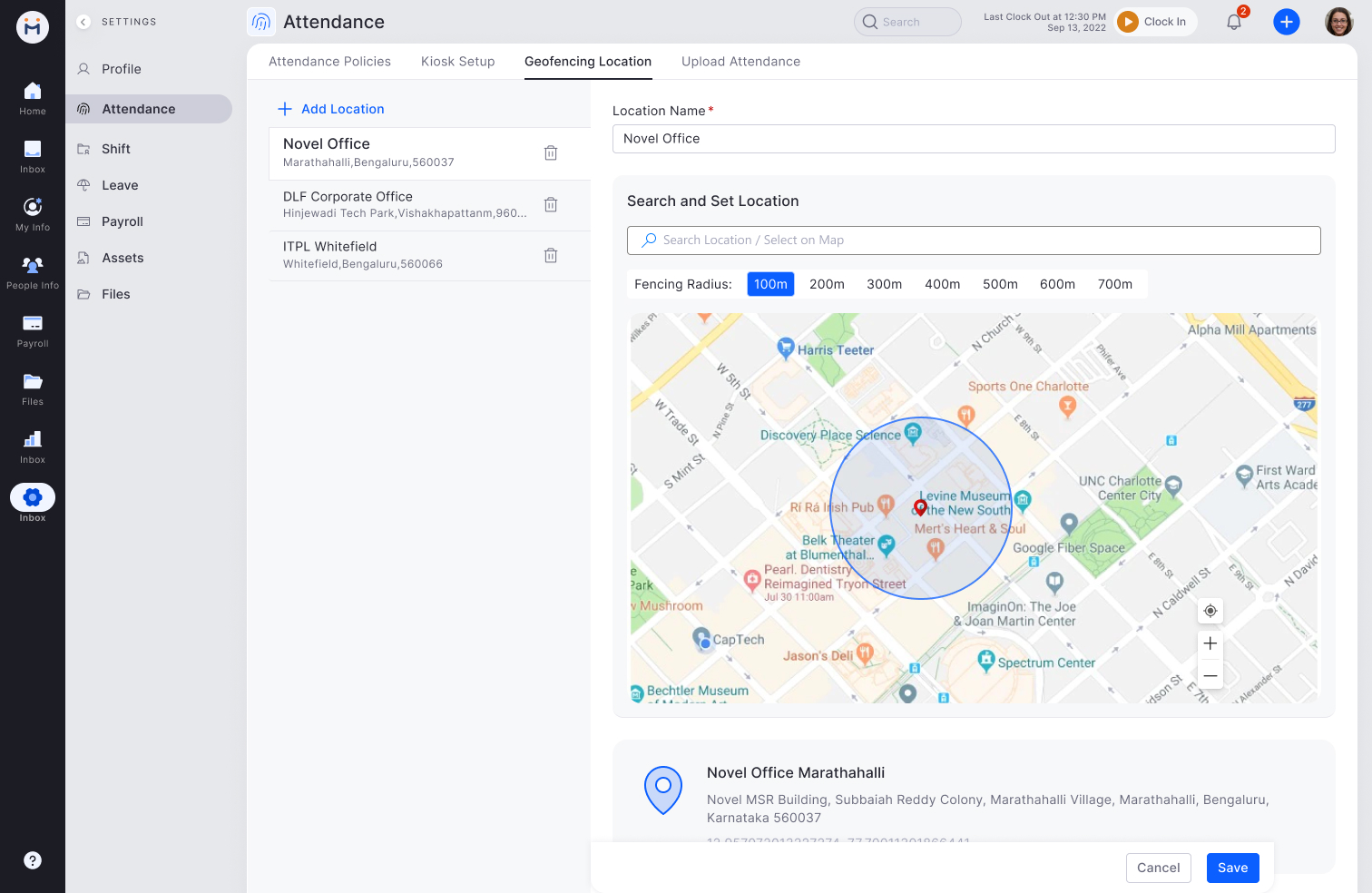
Geofencing Location Setup — FinalLocation list (Novel Office, DLF Corporate, ITPL Whitefield). Search + set location on map. Fencing Radius selector: 100m / 200m / 300m / 400m / 500m / 600m / 700m. Blue circle drawn on map showing radius. Address confirmed below map before save.
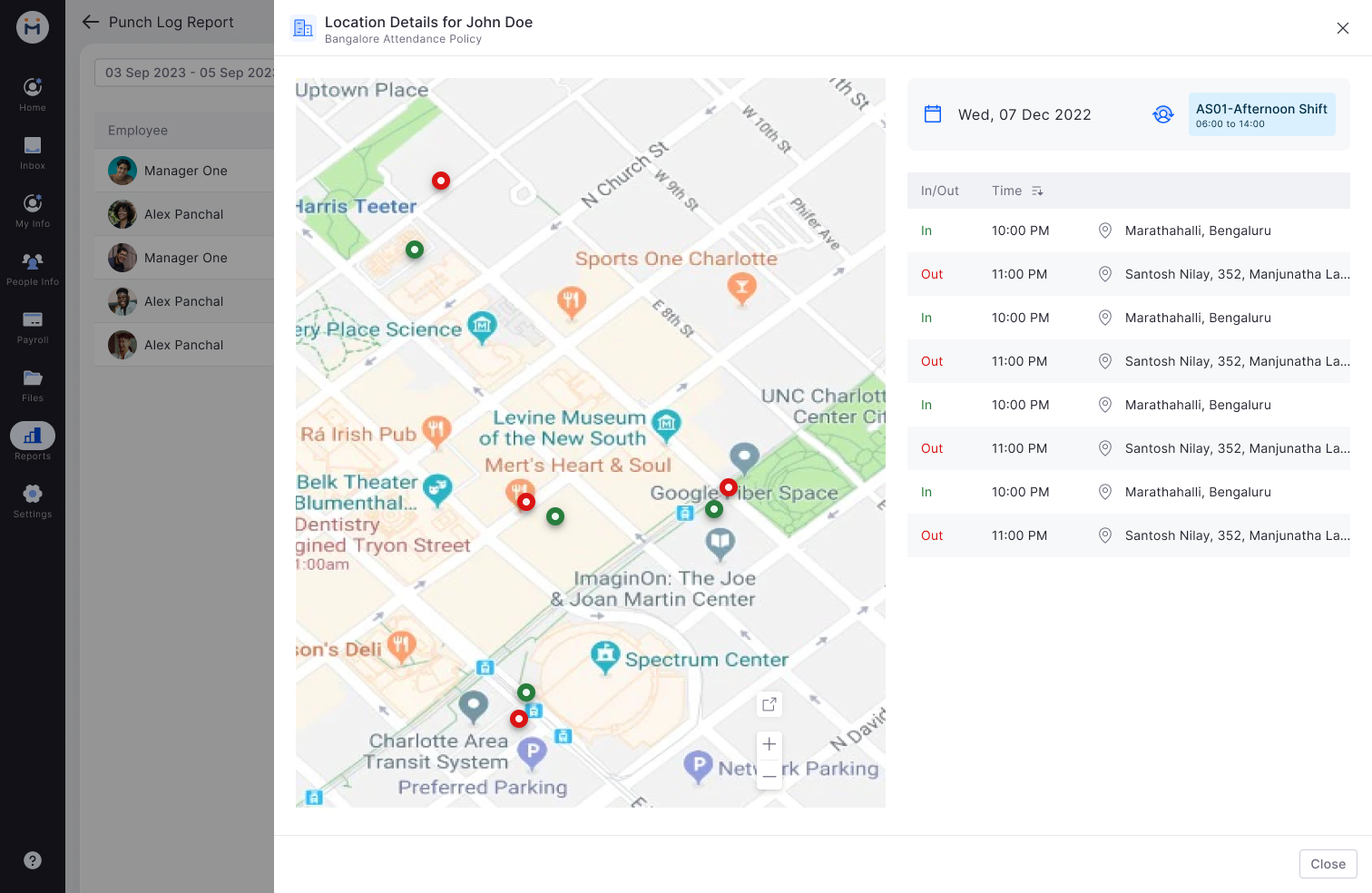
Location Details — Punch Log — FinalEmployee punch log modal: date + shift shown top right. Map with green (In) and red (Out) pins per punch. Table: In/Out, Time, Location address. Multiple In/Out pairs visible for the same day — surfaces anomalies like double punches or wrong locations at a glance.
Design decision — Capturing Options as icon grid: Instead of checkboxes, capturing methods (Web, Kiosk, Mobile, Geo Location, Geo Fencing, Face Recognition) were designed as selectable icon tiles. This made the difference between devices visually clear and reduced setup errors — HR admins could instantly see which capture modes were active.
Key findings that changed the design
Policy preview was a blocker without it: HR managers refused to activate policies without seeing which employees would be affected. We added a live preview showing employee count and any overlap warnings before activation.
Kiosk confirmation audio was critical: Blue collar workers in noisy factory environments couldn't rely on visual feedback alone. We added a distinct audio chime and the worker's name/photo shown for 3 seconds post-scan.
Grace period is not one-size-fits-all: Different roles needed different grace periods. We made it configurable per policy (0, 5, 10, 15 min) rather than a global setting.
Exceptions-first dashboard reduced month-end time significantly: HR managers who used the exceptions view reported spending 60% less time on month-end reviews compared to previous manual process.
What shipped
🧩
Modular policy system
Attendance Settings and Capturing Rules created and updated independently. Changes to one don't require recreation of the other.
📱
Face-scan kiosk
Blue collar check-in without smartphone. Audio + visual confirmation, offline mode with sync, supervisor override.
📊
Exceptions-first dashboard
Only surfaces anomalies — not all 500 employees. Categorised by late, absent, missing checkout. Bulk resolve inline.
🗺️
Mobile geo-fence
Field staff auto check in/out when entering or leaving designated zones. Works in background.
📋
Plain-language policy card
Every employee sees their policy in simple language on their attendance profile. No jargon.
🔔
Proactive absence alerts
Managers notified of absences at shift start — before it becomes a coverage problem. Not at end of day.
100k+
Employees across 100+ companies using the system
60%
Less time on month-end attendance review with exceptions-first view
6
Distinct attendance policy modules shipped across the HRMS platform